Részletes leírás
Szállítási információk
Fizetési információk
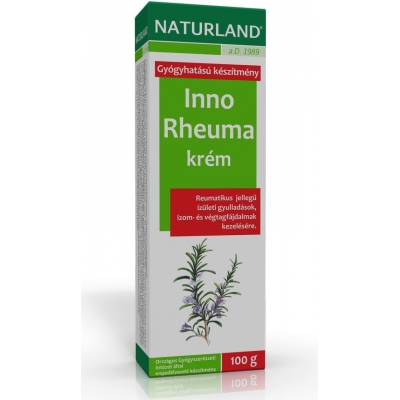
Mik az Inno Rheuma krém hatóanyagai?
100 g krémben: 3,0 g rozmaringolaj (Rosmarini aetheroleum), 2,5 g racém kámfor (Camphora racemica), 1,5 g levomentol (Levomentholum).
Mit tartalmaz még a készítmény?
Segédanyagokat: tisztított víz, fehér vazelin, cetil-sztearil-alkohol, poliszorbát 60, folyékony paraffin, alumínium-acetát-tartarát-oldat, 96%-os etanol
Tartósítószer: metil-parahidroxibenzoát
Mikor nem szabad alkalmazni az Inno Rheuma krémet?
Kámforra, mentolra érzékeny egyének ne alkalmazzák!
Mit kell tudnia az alkalmazás megkezdése előtt?
Tudnia kell, hogy nincs-e az alkotórészek iránti túlérzékenysége (allergiája).
Lehet-e az Inno Rheuma krémet más gyógyszerekkel együtt alkalmazni?
Más reuma ellenes helyi készítménnyel egyidejűleg nem alkalmazható.
Mi a teendő, ha Ön várandós vagy szoptat?
A várandós állapot első harmadában a készítményt ne használja! A szoptatás ideje alatti alkalmazás során ügyeljen arra, hogy a készítmény az emlőkre ne kerüljön!
Hogyan kell az Inno Rheuma krémet alkalmazni?
Naponta 2-3 alkalommal a fájdalmas testrészt és környékét a krémmel vékonyan be kell kenni, majd óvatosan bedörzsölni.
Milyen nem kívánt hatást okozhat az Inno Rheuma krém?
Mentolra, kámforra érzékeny egyéneknél allergiás reakciót válthat ki. Bőrvörösödés vagy más szokatlan tünetek esetén hagyja abba a kezelést!
Mire kell még ügyelnie az Inno Rheuma krém alkalmazása során?
A krém használata után mosson kezet! Vigyázzon, a krém a szem környékére, arcra, nyílt sebre, vérző testrészre, nyálkahártyára ne kerüljön! A kezelt testfelületen ne alkalmazzon párakötést, ne melegítse!
Mennyi ideig alkalmazható a készítmény?
Abban az esetben, ha tünetei hét napos kezelést követően nem csökkennek, illetve nem szűnnek meg, hagyja abba a kezelést és keresse fel orvosát!
Hogyan kell tárolni az Inno Rheuma krémet?
Legfeljebb 25°C-on. Gyermekek elől gondosan elzárandó!
Mennyi ideig használható fel az Inno Rheuma krém?
A krémet csak a csomagoláson feltüntetett lejárati időn belül szabad felhasználni.
Szállítási díjak:
| Személyes Átvétel | Átvétel MPL Ponton | Kiszállítás MPL-el | Átvétel GLS Ponton | Kiszállítás GLS-el | |
| 0-10.000 Ft-ig | 0 Ft | 990 Ft | 1990 Ft | 990 Ft | 1790 Ft |
| 10.000-18.000 Ft-ig | 0 Ft | 990 Ft | 1990 Ft | 990 Ft | 1490 Ft |
| 18.000 Ft felett | 0 Ft | 990 Ft | 1990 Ft | 0 Ft | 0 Ft |
">1.Payment at the pharmacy
This payment method can only be selected if you have selected personal pickup as one of the delivery methods.
After notification, you can pay at the pharmacy with cash, bank card or health fund card.
Accepted health insurance cards:
Allianz, Dimension, Generali, Medicina, MKB,OTP, Pharmacy, Premium, Tempo, New pillar, Railway, Vitamin
A tip: If you would not like to receive your package in person, but would like to have it billed to your health fund membership card, please enter your health fund details in the billing name. We will then issue an invoice that you can submit for billing later.
2.Payment by cash on delivery
The fee in all cases, regardless of the order value, is 390 HUF gross.
It is also possible to pay by bank card at GLS pickup points and with the GLS courier.
3.Online credit card payment
In this case, after clicking the "send order" button at the end of the order, the system will navigate you to the SimplePay page, where if you enter your bank card details and approve the transaction, we can immediately book the amount in our system.
Shipping fees:
| Personal Collection | Pick-up at MPL Point | Delivery by MPL | Collection at GLS Point | Delivery with GLS | |
| 0-10,000 HUF | 0 Ft | 990 Ft | 1990 Ft | 990 Ft | 1790 Ft |
| From 10,000-18,000 HUF | 0 Ft | 990 Ft | 1990 Ft | 990 Ft | 1490 Ft |
| Over 18,000 HUF | 0 Ft | 990 Ft | 1990 Ft | 0 Ft | 0 Ft |
A tip: you can change any of the data entered by clicking on the MODIFY button behind the selected option.
- If everything is correct, click on " CONTINUE TO CHECK" . Here you can check all the data again. If something is not correct, you can still correct it. Click on the " SUBMIT DATA" step at the top of the page, then the page will jump back to the requested screen.
- We're almost there, before you click the "SEND ORDER" button, you just need to click the small box before accepting the data processing information under Summary.
- If you are a registered user, you can request a credit for your loyalty points by placing a checkmark in the second small box.
- You can complete your purchase by clicking the "SEND ORDER" button.
- If you are registered, before completing your order, you can see here how many points you have received for your purchase in our Loyalty Program.
- Your order number will now appear on the screen. Please refer to this number when contacting us!
- You will then immediately receive a confirmation email to the email address you provided. This will show the details of your order. If you have any questions, please feel free to contact us via email or using one of the contact details at the bottom right of the page.
The placed order can be recalled at any time from its own menu and, if necessary, re-ordered using the "ADD PRODUCT TO CART" button.
">